
Data Exporter v1.4.0 is out and it's a pretty significant upgrade for anyone using it for indicator research or machine learning pipelines.
What's new in v1.4.0:
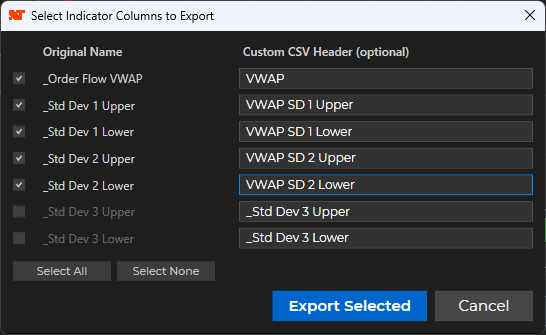
- Indicator selector dialog — when you click Export with "Export chart indicators" enabled, a dialog now pops up listing every indicator plot on your primary series. Check the ones you want, leave the rest unchecked.
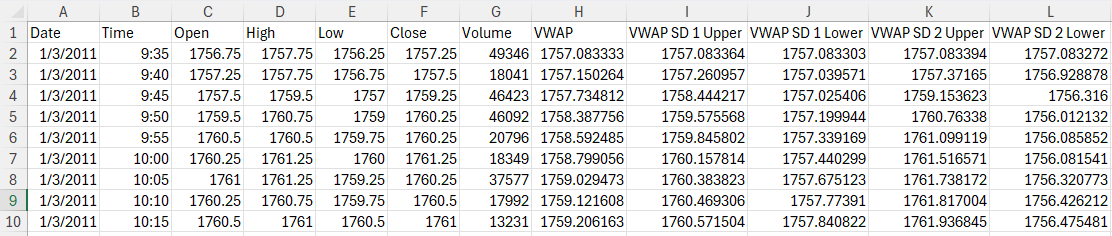
- Custom CSV column names — each selected plot has an editable header field. Rename _Order Flow VWAP to VWAP, rename the SD bands to whatever makes sense for your workflow. The name you type is exactly what lands in the CSV header row.
- Select All / Select None buttons for quick column management when you have a lot of indicators on the chart.
- Clean cancel behavior — if you close the dialog without clicking Export Selected, the entire export is aborted cleanly rather than proceeding with no indicator columns.
Here's what the dialog looks like with a VWAP indicator (5 plots — the anchor VWAP plus SD1 upper/lower and SD2 upper/lower):
And the resulting CSV opened in Excel:
To update, log in at futures.aeromir.com, go to your downloads page, and grab the latest zip. Re-import via Tools > Import > NinjaScript Add-On and restart NinjaTrader.
As always, if you run into anything drop a reply here or open a support ticket.