Now Enrolling — Self-Paced Online Course

The Algo Method

The Complete Pipeline — From Raw Data to Live Automated Bot

No black boxes. No mystery. A comprehensive self-paced course covering the complete pipeline — from exporting market data with FOMC exclusions, time filters, and custom indicator values, through AI-assisted strategy building, robustness testing, and all the way to a live managed-order strategy running on your NinjaTrader prop firm accounts. Nine modules, 50+ on-demand video lessons. Work through it at your own pace, revisit any lesson anytime.

Export Data
→
AI-Assisted Build
→
Robustness Test
→
Convert & Validate
→
Deploy Live
What You'll Learn
✓Using the Data Exporter to pull clean, filtered market data — OHLCV, indicator values, full VWAP — with FOMC dates, holidays, early-close sessions, and custom time ranges excluded before Builder ever sees a row
✓How to use AI (Claude or ChatGPT) to configure Adaptrade Builder by screenshotting dialogs and prompting with your objective, symbol, and timeframe — so you go into every build with two sets of eyes instead of one
✓Reading the build progress chart — recognizing when the genetic algorithm has found something real versus when it has shifted into curve-fitting mode, so you kill bad builds early instead of advancing junk into your robustness suite
✓Running the full robustness suite — walk-forward testing, Monte Carlo simulation, out-of-sample validation — to filter out fragile strategies and keep only what actually holds up under stress
✓Using AI as a second set of eyes to iterate on Builder settings when a run doesn't produce what you wanted — faster feedback loops, fewer wasted builds
✓Why Adaptrade's NinjaTrader export uses outdated unmanaged order code — and how to convert it to managed orders in minutes using the included converter class, so your live strategy doesn't break in ways a backtest will never show you
✓Validating the NinjaTrader import — confirming backtest results match Builder before you advance, so you know you're deploying exactly what you tested
✓The complete final validation workflow — trade exports and a last robustness pass — so the strategy is properly stress-tested before it ever touches a live prop firm account
The Five-Stage Pipeline
1
Export Your Market Data
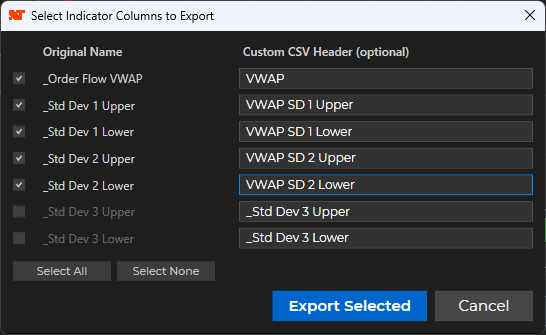
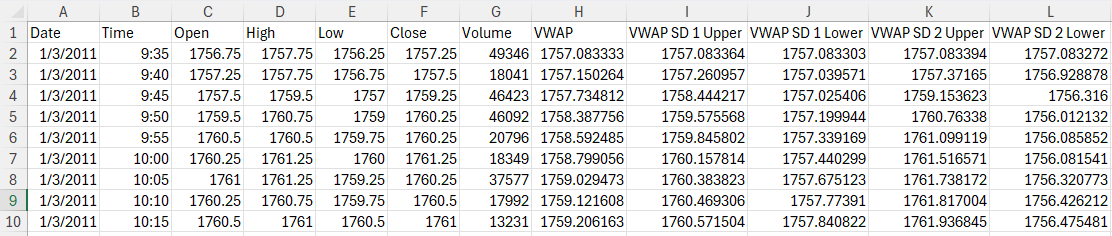
The Data Exporter goes well beyond basic OHLCV. Exclude FOMC announcement dates, holidays, early-close sessions, and custom time windows. Export any indicator values you want — and VWAP data is built in without needing a separate indicator on your chart. Clean, filtered data is the foundation everything else depends on. Garbage in, garbage out — this stage exists so you never hand Builder a contaminated dataset.
Data Exporter indicator selector Data Exporter Excel output with VWAP columns
2
Configure & Build with AI Assistance
Screenshot the Adaptrade Builder setup dialogs and drop them into Claude or ChatGPT. Tell the AI your objective, your symbol, and your timeframe and ask it to help dial in the settings. You get two sets of eyes — yours and the AI's — before the genetic algorithm ever runs. This isn't using AI as a magic button; it's using it as a knowledgeable collaborator that's read the entire Builder manual and can flag settings that don't match your goals.
3
Monitor the Build — Know When to Kill It
Watching the build progress chart is a skill. There are clear telltale signs when the genetic algorithm has found a genuine strategy versus when it has shifted into curve-fitting mode. You'll learn to recognize that inflection point and stop the build before you waste time — or worse, advance a curve-fitted strategy into your robustness suite and spend two more hours testing something that was never going to survive.
4
Run the Robustness Gauntlet
Walk-forward testing, Monte Carlo simulation, out-of-sample validation. The whole goal is to throw out junk. If a strategy doesn't survive, go back to Builder and AI together to iterate — tweak parameters, re-run, evaluate again. Only strategies that pass the full suite advance. This is the stage that separates strategies that work from strategies that worked on the data you trained them on.
5
Convert to Managed Orders & Validate Live
Adaptrade's NinjaTrader export uses 10-year-old unmanaged order code that makes the strategy responsible for tracking every order detail — a maintenance nightmare that can cause real problems in live trading. You'll use the included converter class and checklist tool to swap in managed orders in minutes instead of a week. Then confirm the NT backtest matches Builder, run a final trade-export robustness pass, and deploy to your prop firm account with confidence.
What's Included
9 modules — 50+ On-Demand Video Lessons $1,997 value
Live Session Recordings & Supplemental Instructor Videos $297 value
Data Exporter tool $99 value
Managed Order Converter class $197 value
Conversion Checklist & Web Tool $97 value
All Aeromir Autotraders — 1 Month
Full access to Phoenix and all NinjaTrader strategies (current & legacy) for 30 days — normally $249/mo
$249 value
Lifetime Access to All Course Content $197 value
Total Value $3,133+
Enrollment
$997
Enroll Now — $997

All sales are final — review our billing policy before enrolling.

Self-paced. Zero to live strategy.
Properly tested, managed orders, prop-firm ready.

Self-paced. Zero to live strategy.
Properly tested, managed orders, prop-firm ready.

Watch the Course Overview
What You'll Need
NinjaTrader 8 — Windows PC Required
NinjaTrader is Windows-only. Free to download at ninjatrader.com. You'll need a data source to follow along — a broker, prop firm connection, or third-party data provider all work.
Adaptrade Builder
A free 30-day trial is available at adaptrade.com. Full license is $999 — Mike Bryan offers a $100 off coupon when you join his mailing list, bringing it to $899. The trial is enough to complete the course.
Claude or ChatGPT
A paid subscription to either is recommended but not required. We use AI throughout the course to configure builds, review settings dialogs, and iterate on results.
Full Investment Picture
Course: $997 • Adaptrade Builder: $899 (after coupon) • NinjaTrader: Free • Claude/ChatGPT: ~$20/mo optional
One profitable prop firm payout typically covers the entire cost.
Is This Course For You?
This IS for you if…
You want to build your own automated strategies — not buy a black box someone else built
You're actively trading futures at prop firms or in your own account on NQ, ES, MNQ, or MES
You've tried manual systems and want the automation advantage — no screen-watching, no emotional decisions
You're curious about algo trading but don't know where the pipeline starts or how to avoid curve-fitting
You want a repeatable, systematic process you can run again and again — not one-off hacks
You trade options or equities and want a proven futures strategy to give you a directional bias on ES or NQ before placing your spreads
You're comfortable with software but don't need to be a programmer — the tools and converter class handle the code
This is NOT for you if…
You're looking for a managed service or someone to trade for you
You expect guaranteed profitability from any strategy — no course can promise that
You want a turnkey "push button and profit" system with no effort on your part
You're not willing to put in the work to understand what you're building and deploying
You're running on a Mac — NinjaTrader 8 is Windows-only
Course Curriculum

9 modules • 50+ lessons • Self-paced • Lifetime access • New videos added as sessions are held

  • Welcome to The Algo Method
  • The Five-Stage Pipeline

  • NinjaTrader 8
  • Adaptrade Builder
  • The Data Exporter
  • Download the Adaptrade and Aeromir Files
  • AI Tools
  • The Builder Converter
  • Phoenix Autotrader

  • Installing NinjaTrader 8
  • Connecting to Your Data Feed
  • The NinjaTrader Interface
  • Instruments and Session Templates
  • Chart Setup for the Algo Method
  • Installing Aeromir Add-Ons
  • Sim Trading Setup and Verification

  • What the Data Exporter Does and Why It Exists
  • Adding the Data Exporter to a Chart
  • Running Your First Export
  • Understanding and Validating Your CSV
  • Keeping Your Data Current

  • Introduction to Adaptrade Builder
  • The Build Workflow
  • Interpreting Your Build Results
  • Build Symbols Settings
  • GP Settings Guide
  • Build Metrics Settings Guide
  • Performance Metrics Reference
  • Stress Test Settings
  • Lock Options Settings
  • Indicators Settings
  • Order Types Settings
  • Strategy Logic Settings
  • Neural Network Settings
  • Parameter Ranges Settings
  • Position Sizing Settings
  • Evaluation Menu Settings

  • Exporting to NinjaTrader
  • Post-Build Testing and Ongoing Strategy Management

  • Unmanaged vs. Managed Orders — Why It Matters for Live Trading
  • Using the Builder Converter Tool
  • The AI Prompt — Final Edits After Conversion
  • Compiling and Verifying the Converted Strategy
  • Troubleshooting Common Conversion Problems

  • The Robustness Testing Philosophy
  • Using the Strategy Robustness Analyzer
  • Using the Trade Quality Analyzer
  • Using the Prop Firm Strategy Analyzer
  • The Correlator
  • The Complete Pipeline — From Builder Output to Live Deployment

This module grows over time. It includes recordings of live classes and Q&A sessions as they are held, plus supplemental videos recorded by the instructor covering additional topics and techniques. All are included with your enrollment at no additional charge.

  • 11 April 2026 — The Algo Method Live Class
Frequently Asked Questions

No. Adaptrade Builder generates the NinjaScript code for you, and the included Managed Order Converter class and checklist tool handle the conversion. You'll need to be comfortable installing software and following a technical workflow, but you don't need to write code from scratch. That said, if you are a programmer, you'll have a deeper appreciation for what's happening under the hood — and the converter class is open for you to inspect.

No. NinjaTrader 8 is Windows-only. If you're on a Mac, you'd need to run Windows via Boot Camp or a virtual machine (Parallels, VMware Fusion). This is technically possible but adds complexity and is not something we walk through in the course. If your primary machine is a Mac, make sure you have a workable Windows setup before enrolling.

Adaptrade Builder is $999. Mike Bryan offers a $100 coupon when you join his mailing list, bringing it to $899. A free 30-day trial is available and is sufficient to complete the course. So the full picture looks like this:
  • This course: $997
  • Adaptrade Builder: $899 (after coupon) or free for 30 days during trial
  • NinjaTrader 8: Free
  • Claude or ChatGPT: ~$20/mo (optional but recommended)
To put that in context: one successful prop firm payout on a standard Bulenox or APEX account typically covers the entire cost.

Any prop firm that supports NinjaTrader 8 automated trading. The instructor currently runs live automated strategies on Bulenox, APEX Trader Funding, and Lucid Trading. The course covers the complete workflow for deploying to prop firm accounts including the prop-firm-specific robustness testing that accounts for drawdown limits and daily loss rules.

The video content alone is several hours. Realistically, working through the full pipeline — including running actual builds in Adaptrade Builder, going through the robustness suite, and doing the managed orders conversion — takes most people a weekend to a couple of weeks depending on how much time they can put in. Because it's self-paced, you can move as fast or as slowly as you need. You have lifetime access, so there's no deadline.

Immediately. As soon as your payment is processed you'll receive an email with login instructions and full access to all course content.

Yes. The course is self-paced and there's no requirement to go in order. If you already have NinjaTrader installed and connected to a data feed, skip ahead to Module 4 (The Data Exporter) and start building. Modules 2 and 3 are there for people starting from scratch — not a prerequisite for the pipeline content.

The short answer is the Data Exporter. The Data Exporter can export indicator values — RSI, ATR, VWAP, whatever you want — alongside OHLCV data into the CSV file that Builder ingests. Adaptrade Builder can then use those indicator values directly as inputs to the genetic programming process when building strategies. Build Alpha and StrategyQuant cannot do this — they work from price data and calculate their own indicators internally, which means you can't feed them pre-filtered, pre-calculated indicator data as building blocks the way you can with Builder.

This matters because it gives you direct control over what the genetic algorithm is working with. You're not hoping Builder picks the right indicators — you're handing it exactly the data you want it to build around. That's a meaningful edge, and it's the reason the Data Exporter and Adaptrade Builder are the foundation of this pipeline rather than the alternatives.

Yes. Additional videos are being added to course pages on an ongoing basis. Module 9 includes recordings of live classes and Q&A sessions as they are held, plus supplemental videos recorded by the instructor covering additional topics and techniques as the course evolves. All updates are included with your enrollment at no additional charge — lifetime access means exactly that.

All sales are final. Please review the full curriculum, watch the course overview video above, and read our billing policy before enrolling. If you have questions before purchasing, contact us and we'll be happy to help you decide if the course is right for you.
Meet the Instructor
Tom Nunamaker
Tom Nunamaker
Founder, Aeromir • Retired USAF Major • Trading Since 1982

I don't teach theory. I teach what I actually do with real money in real prop firm accounts. The Algo Method is the exact pipeline I use to build, test, and deploy automated strategies — the same process that produced the Phoenix Strategy, which has run live on NinjaTrader with 100/100 robustness scores and win rates above 60% across multiple instruments.

I spent 6.5 years working alongside Dan Sheridan, a former CBOE market maker, and have been programming since 1974 — which means I can look under the hood of these tools and explain what's actually happening, not just click buttons and hope. I built every tool in this course myself: the Data Exporter, the managed order converter class, the checklist tool. When I hit the unmanaged orders wall with Phoenix, I spent a week rebuilding it from scratch. That converter class exists so you never have to.

I'm currently running live automated strategies across Bulenox, APEX, and Lucid prop accounts on NQ, MNQ, ES, and MES. This isn't archived curriculum — it's what I'm doing right now, with real money, every trading day.

Trading Experience
Since 1982 — 40+ years
Programming
Since 1974 — 50+ years
Military Background
Retired USAF Major • T-37, T-38 & KC-135 IP
Phoenix Strategy
100/100 robustness • NQ 67% WR
Currently Trading
Bulenox, APEX & Lucid live accounts • NQ, MNQ, ES, MES